![]() |
LilyTerm
|
Light but full function.
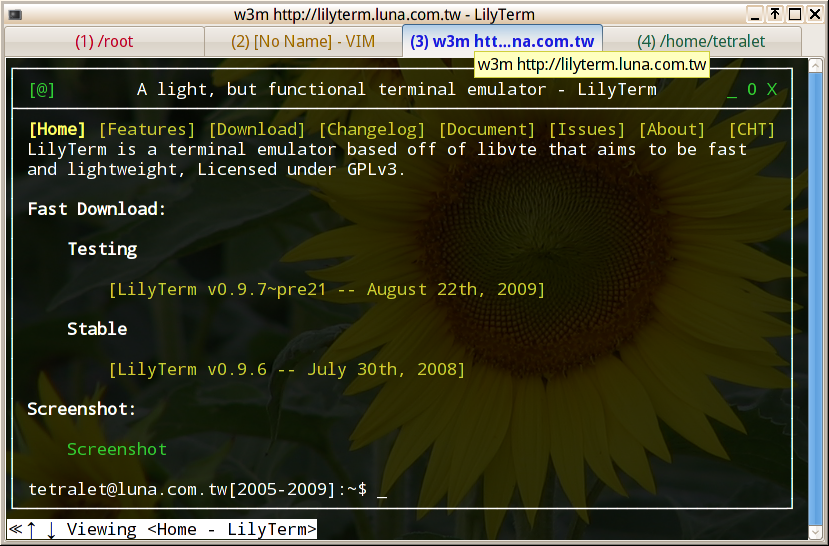
Support multi tabs, reorderable tabs, and hide the tab tray when there is only 1 tab.
Add, close, switch, move, rename tabs with function keys. [1]
Disable/Enable function keys for temporary. use <Ctrl><`> by default.
Shows the foreground running command on tab and/or window title.
'Single Process' Support. The newer launched LilyTerm will be just a new window of 1st launched LilyTerm.
Colorful page name.
Use kill() to kill running shell when use <Ctrl><W> or <Alt><F4> to force close this tab. Or the sub-process of this tab will be closed at the same time.
Change the font name, size, and window size with right click menu.
User custom function keys. (need to edit profile) [2]
Support User/System profile, or use -u command line option to specify a custom profile.
Support true transparent. (need window manager is composited, too.)
You should install Compiz, Beryl or xcompmgr to support it.
L10n/i18n support. Call for translators!
Support for transparent background and background saturation.
Support for text and background color.
Well support for UTF-8.
Decide the text coding via environment. Using UTF-8 by default.
Change the text coding with right click menu, or open a new tab with specified locale by right click.
Tetralet <tetralet AT gmail DOT com>
2-clause BSD-like license
libvte Patch For Input Methods:
(Patch)
(Debian Lenny Package) (0.16.14) (2008/6/9 updated)
(Ubuntu Gutsy Package) (0.16.9)
- (Ubuntu Hardy Package) (0.16.13)
2008/7/10 (0.9.5)
You need libvte-dev, autoconf, automake, gettext, libxml-parser-perl and intltool to build LilyTerm, and execute ./autogen.sh to create configure file.
You may use new_tab_key = (without a value) to disable this function key.
You may use lilyterm -p to got a profile sample.
You may use [Get function key value] in menu to get a function key to use in profile.
You may use [Save settings] in menu to save the current tab as the default settings.
<Ctrl><T> = New tab
<Ctrl><Q> = Close current tab
<Ctrl><E> = Rename tab
<Ctrl><PageUp> = Prev tab
<Ctrl><PageDown> = Next tab
<Ctrl><Home> = First tab
<Ctrl><End> = Last tab
<Ctrl><Left> = Move current page forward
<Ctrl><Right> = Move current page backward
<Ctrl><Up> = Move current page to first
<Ctrl><Down> = Move current page to last
<Ctrl><O> = Select all the text in the Vte Terminal box
<Ctrl><X> = Copy the text to clipboard
<Ctrl><V> = Past the text in clipboard
<Ctrl><+> = Increase font size
<Ctrl><-> = Decrease font size
<Ctrl><Enter> = Reset font_size
<Shift><Insert> = Past the text in primary clipboard. (Emulate a middle button mouse click to past the text)
Some Chinese fonts don't use monospace on alphanumeris
characters. but we can `bind' a monospace English font and a
non-monospace Chinese Font into single font by edit ~/.fonts.conf: (Thanks to
EdwardLee for this tip!)
But it won't work on every application.
<match target="pattern" >
<test compare="eq" name="family" >
<string>monospace</string>
</test>
<edit mode="assign" binding="strong" name="family" >
<string>DejaVu Sans Mono</string>
<string>WenQuanYi Zen Hei</string>
</edit>
</match>
You may specify the tab's coding with zh_TW.Big5
or Big5 in profile. You may open a new tab with zh_TW.Big5
locale ENVIRONMEN if you using zh_TW.Big5
here.
You may specify the text or background color with white or #FFFFFF
in profile.
If you want to custom the function key, the following is a
example:
The default key in LilyTerm:
Vim fans may like to use:
[key]
new_tab_key = Ctrl T
close_tab_key = Ctrl W
prev_tab_key = Ctrl Page_Up
next_tab_key = Ctrl Page_Down
first_tab_key = Ctrl Home
last_tab_key = Ctrl End
edit_label_key = Ctrl E
[key]
new_tab_key = Ctrl+Shift Insert
close_tab_key = Ctrl+Shift Delete
prev_tab_key = Ctrl+Shift Left
next_tab_key = Ctrl+Shift Right
first_tab_key = Ctrl+Shift Up
last_tab_key = Ctrl+Shift Down
edit_label_key = Ctrl+Shift Return
The Function Key value may be Shift Ctrl Alt(MOD1) MOD3 MOD4 MOD5 (MOD2 is NumLock key), and you can use + to specify multi keys, for instance with Shift+Ctrl. NOTE: There should be no SPACE before and after + in the multi Function Key value.
And, You may got the Work Key value in gtk-2.0/gdk/gdkkeysyms.h. For example, if you want to use [Page Up] key as a work key, you may see that the value of [Page Up] is [GDK_Page_Up] in the file, so that you can use [Page_Up] in profiles. (the prefix GDK_ was removed.) Please note that the key value is case sensitive.
You may use [Get function key value] in menu to get a function key to use in profile.
You may mark the text using [Left Click], and past it by pressing [Middle Click] or <Shift><Insert>.
You should mount the devpts device before you launch LilyTerm in a chroot jail:
mount devpts /PathToChroot/dev/pts -t devpts
If you still encounter trouble when running LilyTerm with Compiz, like black screen, transparent or colorless text, please insure the following setting:
is in your /etc/X11/xorg.conf.
Option "XAANoOffscreenPixmaps"
Email: Please contact the author directly.
Forum: hyperrate
IRC: #gcin@freenode.net
VteTerminal:
A terminal widget implementation.
ROXTerm: A full function libvte based X Terminal Emulator
Evilvte: A tiny libvte based X Terminal Emulator
Wen-Yen Chuang (caleb), many great idea and solution.
EdwardLee, many great suggestion and solution.
Edward Liu, great technique
support.